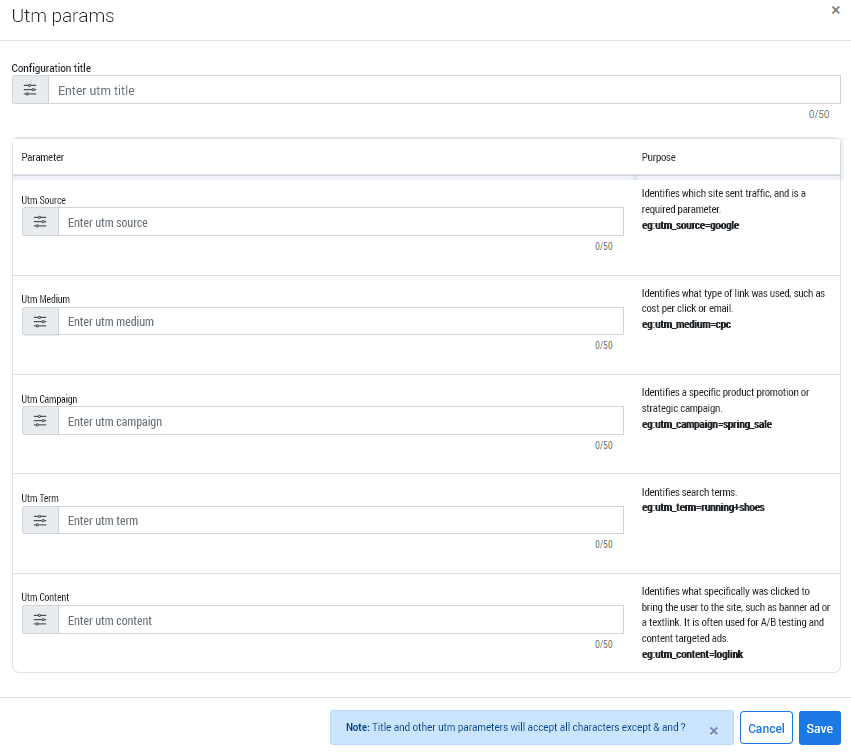
Running digital marketing campaigns without UTM parameters is like driving through a dark tunnel. You don’t know where you’re going or what you’ll find at its end.
It doesn’t have to be this way. Also referred to as tags or codes, UTM parameters let you track the traffic source and analyze the outcome of your marketing campaigns. They are your guiding light through the dark tunnel.
UTM parameters are little strings of code embedded in a URL. They inform Google Analytics about online and offline website traffic sources.
These parameters were developed by a company named Urchin Software Corporation, which Google acquired in 2005. The UTM parameters then laid the groundwork for Google Analytics.
The image below shows howUTM parametersappear in your URL:
Let’s take an example. Suppose you’ve built an attractive landing page to sell your product. Your goal is to drive traffic from different sources to this landing page. Hence, you copy its link and share it via Facebook ads, flyers, emails, and brochures.
When recipients click those links, Google Analytics will show them as direct traffic sources. You don’t know how many people clicked through emails, Facebook ads, or visited your website through brochures and flyers.
A total shot in the dark.
However, adding UTM parameters to the URLs before sharing them through different channels will completely change the game.
Don’t be mistaken. These “vanity URLs” will still redirect customers to the exact same landing page. But thanks to the UTMs embedded within the URLs, Google Analytics will now show five crucial pieces of information:
Source: The source tells where the visitor arrived from. Examples include offline content, website, social platforms, and emails.
Medium: It refers to the marketing technique that persuaded them to click the link. The method could be affiliate marketing, blog, or social media marketing.
Campaign: The specific campaign that referred the visitors.
Term: The precise search term that brought them to the website or the landing page (this is important for pay-per-click or PPC campaigns).
Content: The piece of content that drove them to the landing page.
In the following section, we’ll explain these five UTM parameters in more detail, with examples.
The Five UTM Parameters
To accurately track website traffic, you need these UTMs listed below:
1. utm_medium
This UTM parameter reveals the marketing channels that the site traffic came from. They could be affiliate links, display campaigns, paid campaigns, email, and social media.
There are established naming conventions for these channels. We recommend using those instead of different variations each time. Otherwise, it will be difficult for you to identify the marketing channels inside Google Analytics.
Listed below are some of the established naming conventions:
Affiliate Links: partner, affiliate
Display Campaigns: banner, display
Paid Campaigns: ppc, cpc, cpa, paidsearch
Email: email
Social Media: sm, social-media, social-network, social
Here’s how you write this UTM parameter within a URL: utm_medium=[medium name here]. For social media, that would be: utm_medium=sm or utm_medium=social-network
2. utm_campaign
utm_campaign is used by marketers to identify the name of their campaign.
For example, it could be a lead generation campaign – in which case, you will write the UTM like this: utm_campaign=leadgeneration
It’s that simple!
3. utm_term
This UTM parameter identifies the keywords or specific search terms. As mentioned earlier, it is particularly important for PPC ads.
Use this structure to write the parameter: utm_term=[term name here]
Let’s say, a user types in ‘best keyboards’ in the Google Search bar. In that case, you’d write the parameter as: utm_term=best+keyboards
4. utm_source
Marketers use the utm_source parameter to figure out the ultimate traffic source. While utm_medium tells you that the traffic came from a social media network, it doesn’t identify the specific platform (the ultimate source).
In our social network example, the ultimate traffic source would be Facebook, Twitter, LinkedIn, or Instagram. Both UTM parametersare used in conjunction to help marketers get a fuller picture of website traffic.
Here’s how these UTMs are used:
utm_medium=social&utm_source=facebook
utm_medium=social&utm_source=twitter
utm_medium=social&utm_source=instagram
utm_medium=social&utm_source=linkedin
The source can also be offline. Let’s say you distributed some flyers at a local conference. To track website traffic from flyer number one, you’ll write the UTM in this manner: utm_source=flyer+1
The medium for this example would be ‘display.’
When used in conjunction, your UTM might be: utm_medium=display&utm_source=flyer+1
You get the idea.
5. utm_content
The utm_content parameter is beneficial for
running A/B tests
identifying the exact link that brought traffic if the referring asset had multiple links
A/B Tests
Let’s say, you’ve launched a tool that lets people search for relevant hashtags. To promote the tool, you’ve designed two web banners. They are almost exactly the same, except for one difference.
One web banner says ‘Hashtag Generator’ while the other says ‘Hashtag Locator’. By running an A/B test, you want to see which banner performs better or gets a better response.
In such a scenario, you’d create two utm_content tags, one for each web banner. They might look like this: utm_content=hashtaggenerator and utm_content=hashtaglocator
Assets with Multiple Links
Suppose you send an email to customers with two links inside it – one on a button and another as a hyperlinked text. To determine the exact link that brought you the traffic, you’d use different utm_content tags.
utm_content=button
utm_content=hyperlinkedtext
Alternatively, you can also use numbers to tag the links:
utm_content=link+1
utm_content=link+2
utm_content=link+3
As you might’ve observed by now, you can only use numbers, letters, and symbols ‘+’, ‘-‘, ‘.’ to name the UTM parameters.
Also, as a best practice, keep the UTMs clean, meaningful, and short. Although there’s no character limit on UTMs, the URL itself cannot be longer than 2048 characters.
This brings us to…
The Top Five Benefits of UTMs
Now that you know what UTM parameters are, let’s discuss their benefits in this section.
UTM codes help you:
1. Find Best-Converting Ad Placements
If running ads is part of your marketing strategy, using UTMs to track which ad locations perform best is a must. For example, you create two Google ads to promote the same product but choose two locations for placing them.
You place one ad on the web page’s sidebar while integrating the other with the page’s content. Now, you’d need to leverage UTM parameters to find out which ad location is resulting in more clicks and conversations.
By discovering your best-converting ad placements, you’ll also use your ad spend more judiciously.
2. Run A/B Tests
We’ve talked about A/B testing (also known as split testing) before. The most significant benefit of running A/B tests is that you don’t leave room for guesswork.
Using UTM codes, you can back your marketing activities with solid data. For example, you can determine if Facebook posts with images work way better than those without images.
If that’s indeed the case, most of your Facebook posts (if not all) should have pictures in them. That’s how you publish content that builds a loyal tribe for your business. All thanks to UTM parameters!
3. Identify Best-Performing CTAs
The call-to-action buttons are used everywhere. Websites, emails, and social media ads house these buttons, which prompt users to take certain actions. Take a website, for example.
It may have multiple CTAs on the homepage. How do you identify which CTA, in particular, is drawing the most traffic?
By using UTM tags, of course! This way, you can remove CTAs that aren’t giving any results but only add to the clutter on your beautiful webpage.
4. Monitor Email Performance
Using UTM codes, marketers can analyze email performance to a tee.
You can detect:
which email client is most effective for your business. [Use “email” as the medium and “mailchimp” or “klaviyo” as the source]
which campaign resonates well with your customers [like “winter_exclusives” or “weekly_newsletter”]
which button or link drives conversions [use the content tag]
5. Measure Social Media ROI
To determine which social media network generates the most traffic and conversions, you need to include UTM parameters in your social media URLs.
In fact, you can create a list of the three best-converting social media platforms for your business and focus your marketing efforts on them.
Rather than creating an account on all social networking sites and not being consistent with them, picking at least 2 to 3 social channels and optimizing your content for them is better.
UTM codes not only help you measure the ROI of each social network but also of individual posts and links.
But where can you find UTMs?
That’s what we cover next!
How to Track UTMs in Google Analytics?
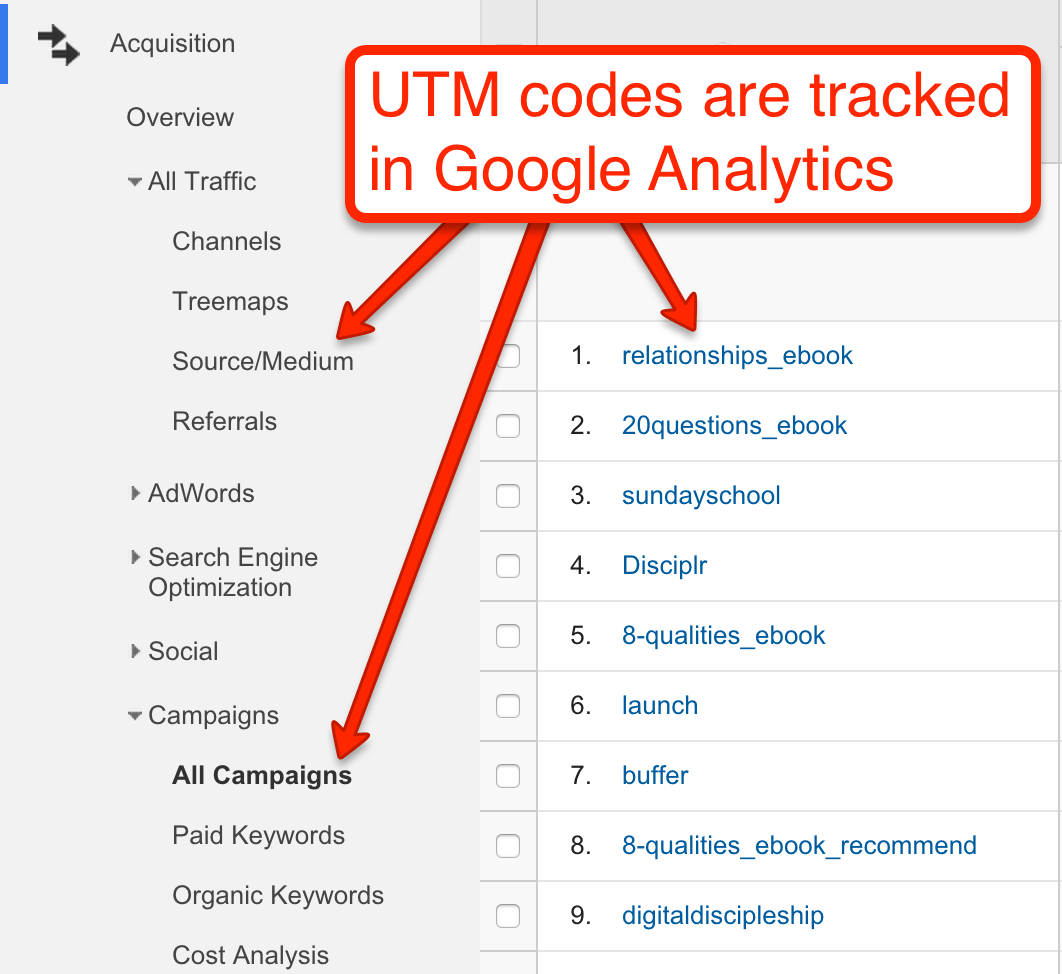
On your Google Analytics dashboard, there are two places where you can find UTM information:
Click on ‘Acquisition’ > Select ‘All Traffic’ > Tap on ‘Source/Medium’
Click on ‘Acquisition’ > Select ‘Campaigns’ > Tap on ‘All Campaigns’
Despite the tremendous benefits, there is one limitation associated with UTM codes. Research indicates that 82% of web sharing occurs by copy-pasting URLs.
This means a user can copy-paste the URL from Facebook and share it on WhatsApp or email. However, on Google Analytics, it will still be shown as traffic from Facebook. Therefore, UTM parameters can give misleading information at times.
UTM tags aren’t the definitive way to measure your content performance. That said, they do give you a broader overview of your marketing campaigns.
Conclusion
You can refine your marketing strategy and boost profits by leveraging UTM parameters. These little bits of code are potential goldmines of behavioural data.
Using Socxly, you can easily create UTMs and start campaign tracking.
Everything You Need to Know About URL Shorteners and How to Get Started
Brands spend a lot of effort creating attractive and eye-catching social media posts that lead to landing pages designed for engagement and conversions. But what about the vessel that takes your user from the post to the landing page – the URL (or simply called the site link)?
Does the URL impact user behaviour in any way? Can it be tailored to increase post and button click-through rates (CTR)? Does it influence the brand image? The answer to all of these questions is yes.
A long URL with a lot of characters can be perceived as a spammy link. On, the other hand, a link created with a URL shortener is neat, takes less character space, delivers the information the user needs, and most importantly, elicits trust.
The URL shortener also lets you add your custom domain, so you can use your brand name and shorten links simultaneously.
In this article, we delve deeper into URL shortening and cover:
URL shortening is the process of converting a long URL with multiple paths and characters into a simple link with a single path and minimal characters (as many as you like). A URL shortener is a service or a platform that enables you to shorten your website’s URLs.
It’s important to understand that the URL shortener does not change the page’s original URL, but simply masks it. What you see on the front-end (within a post, tweet, message, etc.) is the shortened ‘mask’ URL redirecting to the page that is still on the original URL.
For example, we shortened the link to a Kindle on Amazon using Socxly to:
Clicking this link will take you to the original link (https://www.amazon.in/Kindle-10th-Gen/dp/B07FQ4Q7MB/ref=sr_1_1?…..) on Amazon. So the shortener created a mask that redirects the user to the original long URL.
Benefits of URL Shortening
Short URLs help brands in many ways, and URL shortening services add to these benefits by delivering extra add-on features. Here are the benefits of short URLs and the add-ons provided by URL shortening services:
Benefits of a Short URL
1. Better URL Aesthetics
The number one benefit of shortening a URL is better appearance. URLs are generally shared at the end of social media posts, tweets, blog posts, and so on. A long URL looks untidy and confusing and disrupts the conciseness of the post description or the flow of the blog content.
Adding this long URL to a post or blog takes up a lot of space. This URL can be compressed to:
This shorter URL is aesthetically pleasing and does not increase the character count on a post. When added to a blog post, it takes up just a single line making it a much neater option.
2. Easier to Read and Remember
More often than not, long URLs do not give the user the information they need at first glance. In the Business Insider URL we shared earlier, the post’s title comes much later and is not easy to find. In the shortened URL, however, the crux of the post is immediately visible.
URL shortening allows you to keep relevant and important information within the link and discard the rest. This makes it easy to read, shows the information immediately, and is much easier to remember.
3. Reduces the Character Count
Some platforms, like Twitter, have restrictions on the number of characters allowed. Adding long links results in excessive character space, leaving fewer characters for the message you want to post.
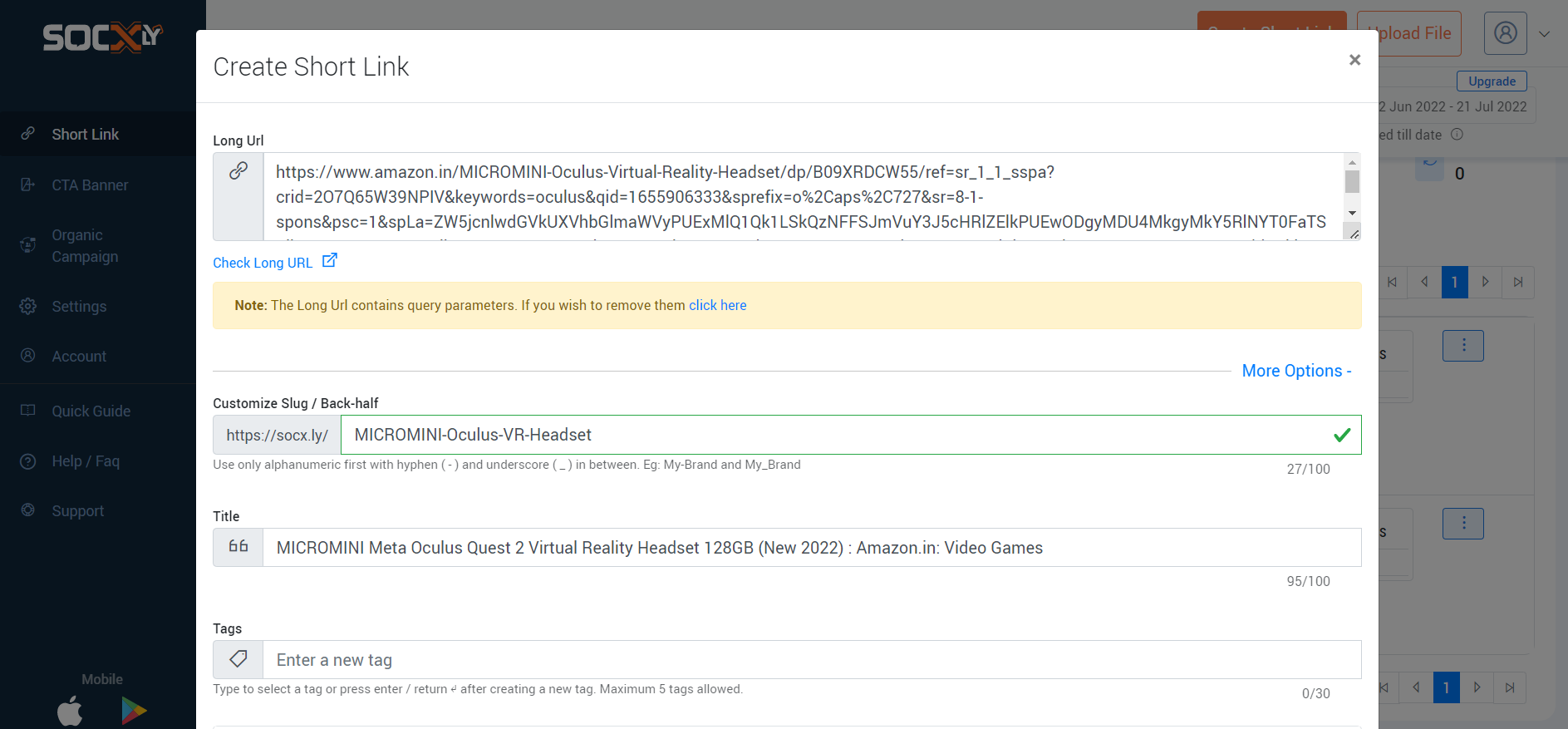
Here is the character count for the link to a VR headset on Amazon:
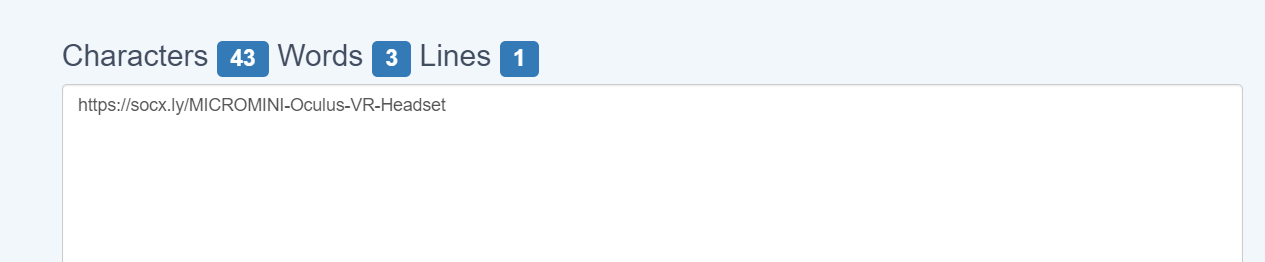
And here is the character count for the shortened URL that leads to the same product page on Amazon:
The shortened URL contains a tenth of the characters of the actual link. This is quite a nifty result when you’re working with limited character spaces.
4. Short URLs are User-Friendly and Enhance Trust
Long URLs, especially ones with special characters like question marks and percentage signs, tend to seem malicious; however, sometimes, they cannot be avoided. If the post’s title is long, if there are many paths, or if you add UTM parameters, the URL tends to become long and include special characters.
In such cases, a URL shortener comes in handy. You can add the full title as the slug (which helps with SEO) when publishing the page and shorten the URL using a shortener before sharing it on other channels. Additional elements like UTM parameters and tags can be added using the URL shortener, making tracking easy as well.
Add-On Benefits of Using a URL Shortener
5. Internal Data Tracking
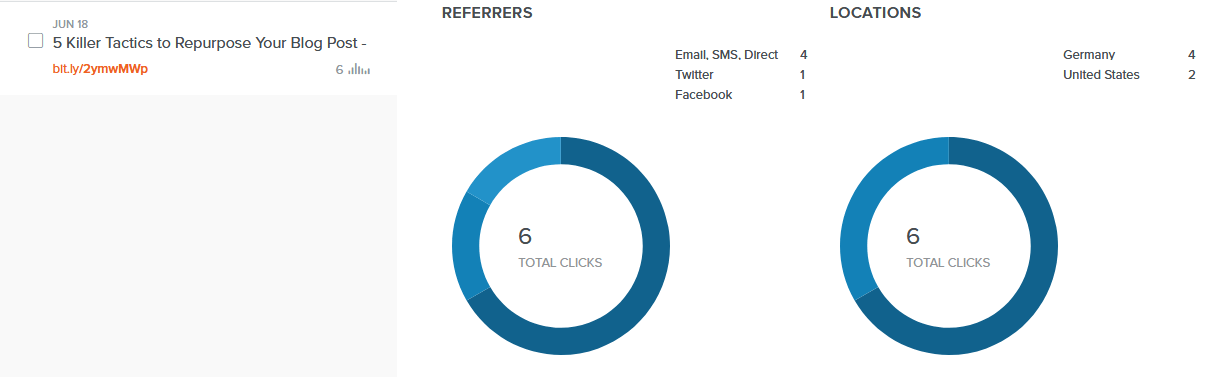
Most URL shortening services track the URLs they provide for impressions, clicks, sources, and other metrics. The data is tracked at a URL level, so you know which ones are performing well and on which channels.
This data is extremely useful for brands that create and share many links, and the URL shortening service makes this data available at your fingertips. Finding this URL-specific data using an analytics system usually requires a lot of configuration and drilling down.
6. UTM Parameters are Included and Shortened
UTM parameters are pieces of code that are added to links to track specific data:
In this example, UTM parameters are added to send back data about the source, medium, and campaign to the analytics system. As you can see, adding UTM parameters tends to lengthen the link.
URL shorteners have two advantages that help in this situation. One is that they provide a host of link data internally, so you may not even need to add extra UTM parameters. The short link can be used, and data can be tracked from within the URL shortener’s dashboard.
The second advantage is that most URL shortening services allow you to embed UTM parameters when shortening the URL. If you have to add UTM parameters to send data back to an analytics system, you can easily do so when shortening the URL. These parameters are masked just like the long URL, so users don’t see them, but they get appended when the link is clicked, allowing you to track the data you need.
7. Meta Data Can be Modified
Platforms like Facebook, LinkedIn, Twitter, and so on, look for certain open graph meta tags (called OG tags) within links to include in the post. When you share a blog link on Facebook as a post, for example, you will notice that Facebook automatically populates the post’s image, title, link, and description. It does this by extracting the meta content associated with the link.
Editing this meta content usually involves editing the source code, and you can only add one set of metadata per link, per site.
Most URL shortening services allow you to edit the meta content when creating a short link. You can change the open graph meta title, meta description, and display link associated with the shortened URL. This allows you to control how the post will appear on social media sites and also lets you create many different post styles for the same link (by creating different short URLs).
URL Shortening Use Cases
Digital Marketing and Analytics
URL shorteners provide in-depth tracking data internally and enable the addition of UTM parameters so campaign data can be tracked using an analytics platform. This lets you track engagement at a macro level and helps you better understand your campaigns and their results.
Social Media Posts
By allowing you to modify the link’s open graph meta content, URL shorteners make it easy to create social media posts that are engaging and consistent across sites. You also get channel-specific click data which helps you determine which channels work for your brand.
Vanity URLs
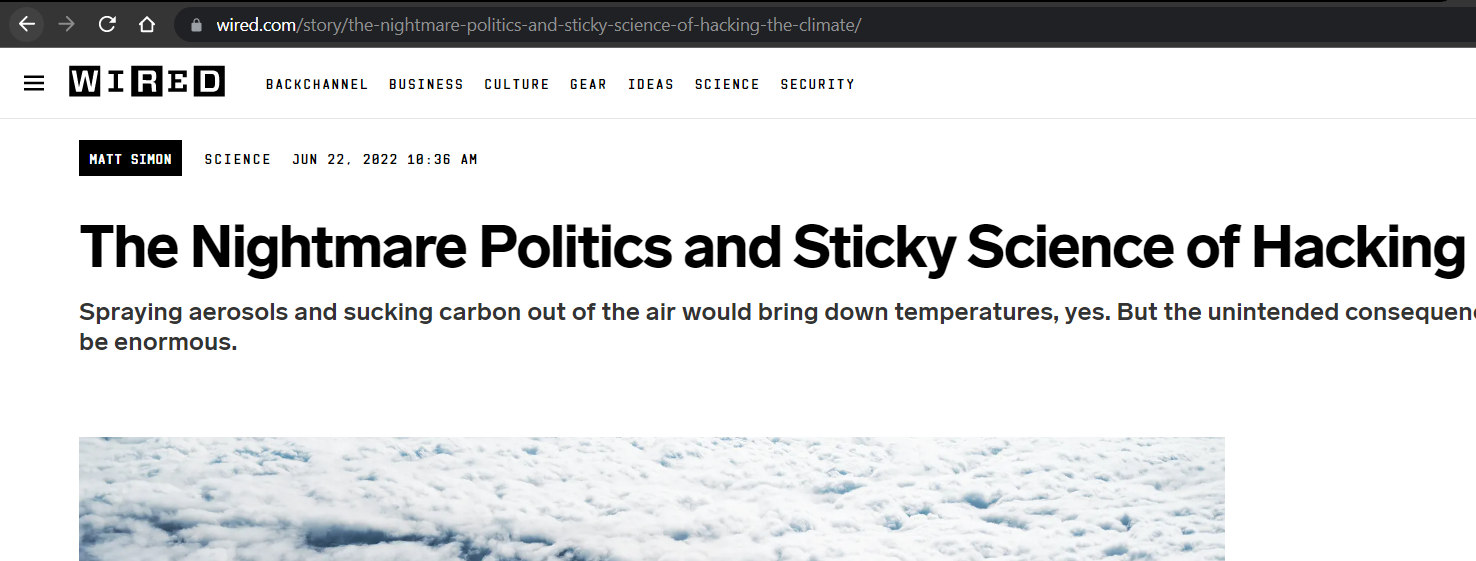
A part of SEO best practices is to create URLs with a detailed path and to include one or more keywords in the slug. This often results in long URLs:
When it comes to sharing these links on social media and other platforms, however, you will find that long URLs do more harm than good. URL shorteners allow you to have long-form URLs that are SEO-friendly and then shorten them for external use. You can use your brand name and short terms for the slugs that make them catchy and easy to remember.
QR Code Marketing
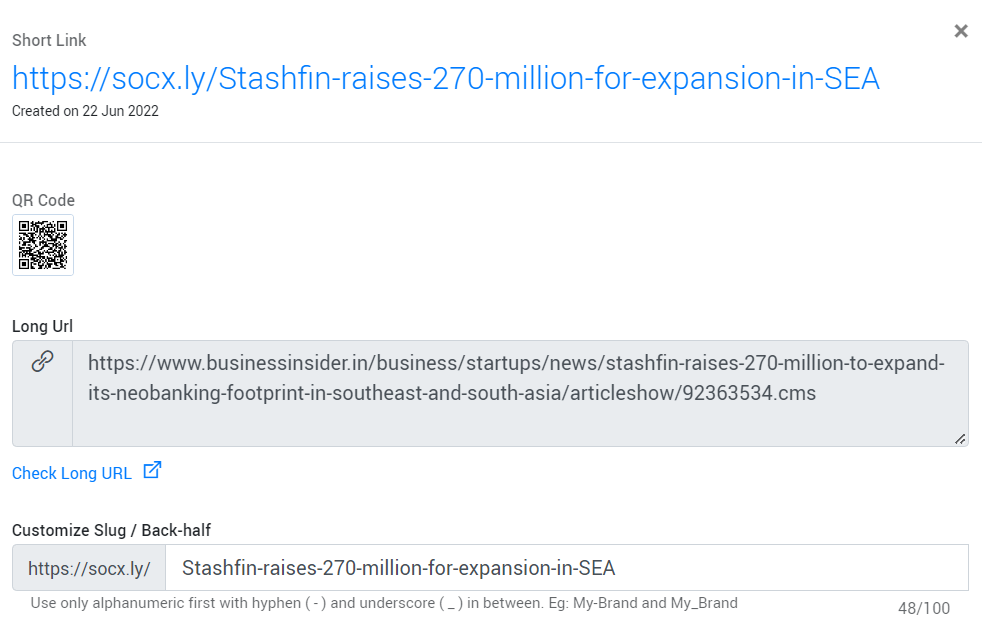
Most URL shorteners also generate a QR code along with the shortened URL:
QR codes are great for marketing; they can be printed on paraphernalia, products, stickers, placed on the website, and so on. URL shorteners give you a way of quickly generating QR codes for your brand links.
Marketing Campaigns
Lastly, URL shorteners are great for creating user-friendly and short URLs with embedded tracking codes (UTM parameters) that can be used for digital marketing campaigns like email and SMS blasts.
URL Shortening Services and How to Use One
Shortening URLs is quite easy. The first step is finding a service that delivers the features you need for a reasonable price.
Most platforms have a free plan that provides powerful features that are more than enough for most brands. Socxly, for example, has a free plan that allows you to shorten 300 URLs per month, and for each URL, you can add UTM parameters, edit social cards, add CTA banners, track URL data, etc. This allows you to get started with URL shortening immediately and for free.
The process of shortening URLs is as follows:
Create an account (you can start with the free account).
Enter the long URL you want to convert.
Either let the platform create a short slug, or you can add a custom slug.
Add UTM parameters if needed.
And that’s it; you’re all done. The short URL is generated with the new slug and stored in your account. You can edit the URL details and the social card meta content whenever you like.
Shortening Your First Link for Free Using Socxly
URL shortening is an important strategy in today’s competitive digital marketing landscape. It enables you to create short, safe, and user-friendly URLs that improve engagement and CTR. Finding the right URL shortening partner is equally important. The platform must give you the tools needed to create impactful URLs for a reasonable price.
The best way to find which platform is right for you is to try the free version. Once you see how powerful the URL shortener is, you can commit and invest in a paid plan. To get started with Soxcly for free, create an account here: SIGN UP NOW.
Building CTAs that Engage and Convert with Socxly
Every marketing strategy you run will have one single purpose at its core – to acquire a conversion. Conversions could be in the form of a form fill, a download, a purchase, or even just a click, and there is one element critical to encouraging these conversions, a CTA.
For someone who isn’t clear what a CTA is, a CTA, or a call-to-action, is an element that calls the viewer to take some action. The ‘Know More’, ‘Download for Free’, and other buttons/links you add to a campaign or webpage are CTAs. Its only job is to encourage the viewer to convert, and that’s why it’s incredibly important that you pay attention to the CTAs you roll out on ads, posters, the website, and so on. The CTA is quite literally the bridge between the marketing campaign (which can be an ad or a landing page) and a conversion.
A well-written and designed CTA can help you increase your campaigns’ and landing pages’ CTR and conversion rates. They are powerful, yet they aren’t too complicated to craft. There are excellent solutions in the market that let you create custom CTAs complete with a display banner and roll them out in a matter of minutes. Socxly is one such solution.
Socxly is a URL shortener that allows you to create CTA banners and link them with the shortened URL. It’s extremely easy to use, and you can generate CTAs in minutes. But first, let’s get the basics right and understand WHAT makes a good CTA, and then look into using Socxly to solve the HOW to create great CTAs quickly.
The CTA should have a clear need and purpose. A CTA guides the viewer and tells them what to do next, and you know what happens when too many guides point in many different directions. Before you place a button or a link to a campaign, analyze if it needs to be there and if it is making a difference.
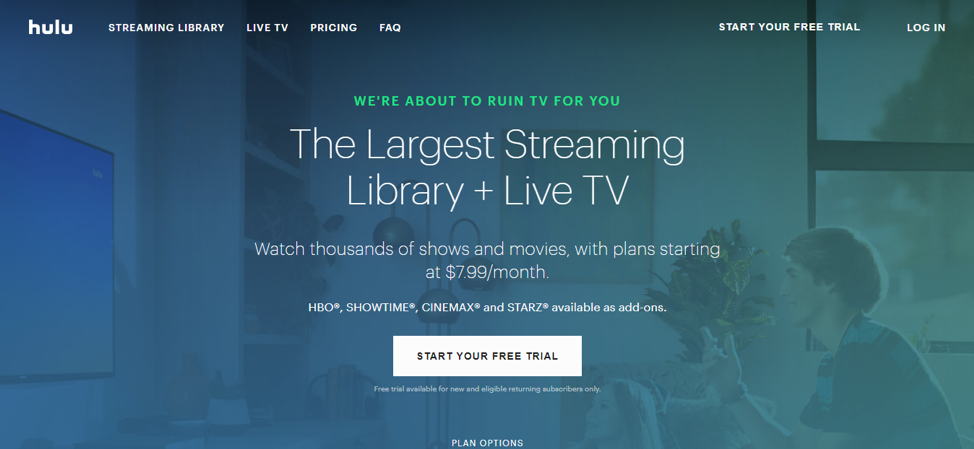
The ‘start your free trial’ button is a clear and crisp CTA, and although there is a ‘plan options’ CTA below it, it stands out and clearly draws the user in. The site knows what the user will find most interesting: a free trial, so they placed a CTA for it.
2. Location, location, location
Where you place the CTA is vital to engagement. Certain areas of a landing page get more attention than others:
This is called the ‘F-Shaped Pattern’. Viewers tend to sweep through content on a page in this manner, so placing important content, including CTAs, in these areas will increase the chances of engagement.
There are other strategies that you can use as well, like pop-ups and fixed CTAs:
Depending on what you’re trying to achieve, select a placement strategy and location for your CTAs.
3. Design to be obvious
CTAs can have a simple design and be more content-focused or be designed to be flashy and grab attention. It completely depends on the style of the campaign or landing page and the message on the CTA. There’s only one rule when it comes to the design of a CTA— it should be obvious. The viewer should know in an instant there is a clickable CTA that will help them go forward in their journey. Check out these CTAs on Apple’s site:
Besides color, nothing separates the CTA from the rest of the text. This might not be a problem when it’s above the fold, but such CTAs placed below the fold could get lost as the user scrolls through. Now, look at these CTAs:
You immediately know what’s actionable and what’s not, and that’s the only rule to designing your CTAs – make them obvious.
4. The message should be clear
The message on your CTA should be clear, concise, and unambiguous. Don’t leave the reader wondering what it does; tell them clearly what the CTA is for. Take a look at this CTA:
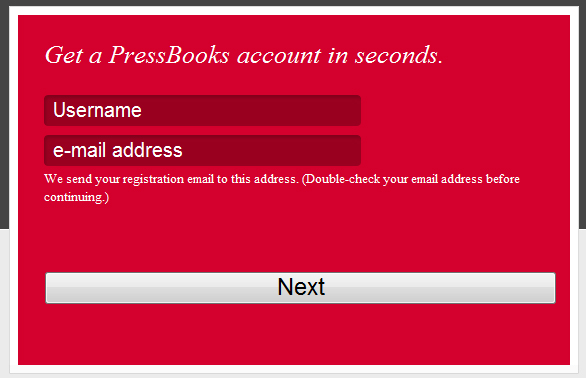
While the positioning and design of this CTA are great, the message could have been clearer. A simple ‘next’ leaves the reader with questions: Are there going to be more steps? How many steps are going to be there? Does this create the account, or does a payment have to be made?
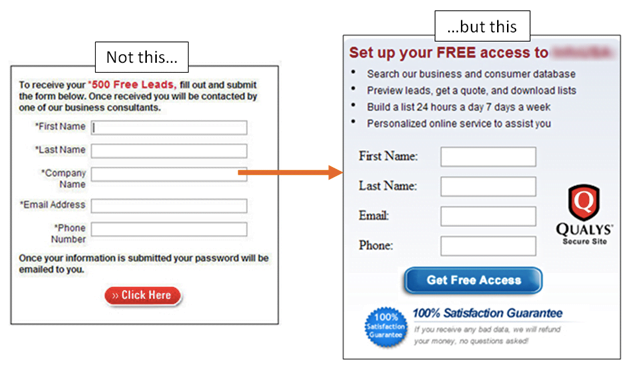
They could have, instead, indicated what happens next – ‘create your free account’, ‘choose a payment method’, etc., would have helped elucidate what the next step is going to be, better. You can see how this would impact the CTR based on these examples:
5. Help them progress in their journey
Lastly, the CTA should take the user forward in their journey (whether it’s information or action), not keep them in the same place. Every CTA should help them progress towards the goal they are looking to achieve.
The CTA on an ad should lead the user to a landing page that gives them more information, and a CTA on a landing page should take them to the pricing page, which has a CTA leading to the checkout, and so on. CTAs should keep the user going forward.
Creating CTAs that Convert with Socxly
Now that you know the rules for crafting highly engaging CTAs, let’s talk about the easiest way of creating them. Normally, creating custom CTAs that you can embed in an email or a website would take time and effort. You must design the banner with the CTA and then code it into the email or landing page.
Creating banner CTAs doesn’t have to be challenging anymore, thanks to Socxly.
What is Socxly?
Socxly is a URL shortening service, but unlike most prominent URL shorteners in the market, Socxly offers many more features.
The free plan allows you to shorten 300 links every month which is more than enough for most businesses. You can easily include UTM parameters, pixel codes, and social media open graph content in a single short URL. You can track the performance of these links and gather metrics like impressions, clicks, and even conversions from the intuitive dashboard.
Apart from the URL shortening feature, Socxly also lets you create CTA banners which is the feature we’re looking for.
Creating CTA Banners with Socxly
Creating a CTA banner using Socxly is easy and takes just a few steps.
Step 1 – Creating the banner
Log in to your Socxly account (you can do this even in the free account).
Click on CTA Banner in the navigational panel and then click Create CTA Banner.
Enter details like the title, the link the CTA should redirect to, and the UTM parameters to be associated with the CTA link.
You can choose to design a banner within Socxly or upload a ready-to-use banner.
Designing a banner within Socxly is straightforward; you add the banner message, CTA text, and an image for the banner. Socxly arranges these elements for maximum conversions.
You can view a preview of the banner (shown on the bottom right) in real-time.
And that’s it, your banner is ready. The next step is associating it with a short URL.
Step 2 – Associating the banner with a URL
Shorten a URL with Socxly
Click on options -> CTA Banner and associate the URL banner created in the previous step with this short URL.
And that’s it. So how does this work?
How Does the CTA Banner Work?
You can share the short URL (https://socx.ly/suyati in this example) anywhere you like. When a user clicks on this short URL, they are taken to the associated long URL (which in this case is https://suyati.com/), and the connected banner automatically renders on the page:
On clicking the CTA banner, the user is redirected to the URL connected to the banner (in this case, https://www.socxo.com/socxly/).
Why is it Better to Build CTAs with Socxly?
Well, the first reason is that it’s easy to design and build a CTA with Socxly. You can upload a banner if you’ve already designed one, or you can create one from scratch in just a few minutes.
The reason that makes Socxly’s CTA banners stand out from other methods, however, is the speed of use. You can easily link a URL banner to multiple short URLs and have multiple CTAs launched instantly. You can quickly swap CTA banners, add new ones, edit existing ones, and have the results published instantly. This makes the entire process convenient and extremely fast to execute.
And finally, Socxly tracks the short URL and the CTA banner and gives you useful insights like impressions, clicks, conversions, and so on. You can easily follow these campaigns from Socxly’s dashboard without making any configurations.
With these additional CTA banners on the website, you can increase website engagement and conversions.
Use Socxly for Free
Want to try Socxly for free? You get all the features we have to offer – URL shortener, CTA banner, organic campaigns, and so on, with the free plan. Give it a shot; we guarantee you’ll love it. Try Socxly for free.
Clickable Social Cards: What are They and Why Do You Need Them?
58.4% of the global population uses some form of social media.
This is over half the world’s population, and your target audience is in it. If you aren’t yet streamlining your social marketing strategies to better reach and woo this audience, it is time to learn a few new tricks.
“Social media cards” – your virtual business cards for social media – are now leading the marketing and advertisement trends. Buffer experimented with the latest feature on Twitter – the capability to create visual tweets – and the results were more than baffling. The businesses that used this feature got:
150% more retweets
89% boost in favorites
18% more clicks than before
The message is clear: a visual, media-rich representation of your brand on a social network works brilliantly to improve audience engagement with your posts. When used right, your business could exponentially increase conversion rates.
However, using visual content for the sake of it isn’t enough; the whole experience of viewing your clickable social card needs to be appealing to your audience.
Let’s learn more about social media cards, why they matter, and how you can leverage them best.
What are Social Media Cards?
Social cards are clickable image posts that can be used on social media. They are highly visual and are meant to draw the viewer’s attention to them, engage them in your offerings, and get them to tap for more information.
Earlier, social media networks weren’t very flexibly designed for use by businesses; the functionalities a social ad could thus offer were limiting. With the option to add images to your social media ad through clickable social cards, your business now has the opportunity to attract and engage a larger portion of the viewers scrolling through your feed.
According to Brain Rules, people can retain 65% of the information they gather from posts with an associated image even after three days. This goes to say that attaching an image with your business information on social media has the potential to garner more attention for a sustained period.
What goes into making a clickable social card?
A social media card typically consists of four elements:
An image that defines your brand to the audience in a captivating way
The title of your business, much like a physical visiting card
The description of your business in a short, hooking sentence
An embedded URL that redirects the viewer to either your landing page or any other location your business intends for that clickable social card
Difference Between a Normal Post and a Clickable Social Media Card
If you observe, clickable social media cards look more or less like a social media post. What, then, is the differentiator between them?
While a typical social media post contains an image, a caption, tags for other concerned people, and hashtags for outreach, a clickable social media card is slightly different in the background. A social card contains everything a post does, and a clickable URL redirects the viewer to a specified destination.
If you tap on a normal social media post, you would still remain on the social network’s feed. However, if you tap on a social media card, you will be redirected to the page the company wants you to see.
You could say that social media cards are visual links to a company’s landing page.
Do Social Media Cards Really Matter?
Images can greatly impact the viewer – especially when the visual content is relatable and bold. Brands leveraging this capability of visual content to turn their social media into a lead magnet reap the true benefits of clickable social cards.
Hubspot, in a study they recently conducted on Twitter clickable social cards, discovered a few very interesting statistics that would make you reconsider not incorporating this strategy in your marketing campaigns:
The tweets with images saw a stellar increase of 55% in the leads they generated
These tweets were also responsible for a 31% increase in visits
There was an increase of 33% in visitor-to-lead conversions through tweets with images
36% more clicks were observed on tweets with images
If your competitors utilize the power of clickable social cards and you don’t, they would be gaining more visitors, leads, and conversions than you. For the sake of business furtherance, clickable social cards are slowly but steadily becoming the norm in social media advertising.
A well-designed social media card conveys more to a visitor than a post can: the visual information delivered will likely stay longer in your visitor’s mind than text-based information. Clickable social cards can give you actual, measurable long-term benefits when designed with the objective in mind and with a view to clearly express it to your consumers.
Tips to Design a Good Social Media Card
Creating an engaging, clickable social media card is straightforward if you have your objectives lined up. Follow the five tips below to create clickable social cards that garner audience attention.
Leverage the Power of Branding
Your consumers shouldn’t have to fish for your brand’s name from the text you include in the social card. While designing one, ensure that you place your logo prominently enough to be noticed as the first thing when your card appears on the feed. Doing this quickly delivers the necessary information to your potential customers while saving you more space on the card to relay other information.
By working on the placement of your brand, you can create a great image that works as it should.
Use Visuals
Visual posts are instinctively more appealing to consumers than ads without any visual aid. Include an aesthetic image that resonates with your brand and objective to get user attention, and then proceed to explain what your ad is about.
A balanced combination of image and text in your social card will work in tandem to improve impressions, click-through rates, and conversions from the clickable social card.
Write Convincing Copy
If you include an image that speaks volumes, an impactful ad copy may not be required at all. However, it is also possible to harmonize these two elements as complementary to make a clickable social card that is bold and speaks directly to the viewer instead of stating a general purpose.
Writing a convincing copy involves a deep knowledge of the ongoing trends (which will be instantly noticeable to people) and connecting the benefits of your products and services to such trends.
Design Intelligently
The design part is the hardest – you need to either source a template that resonates with your business or create your own with brand colors and tone. Apps like Canva get the job done fairly well for small and medium businesses; however, larger organizations like to hire designers to create their own designs.
The colors, accents, fonts, spacing, and even the tone of the social cards need to be in total sync with the brand identity for it to be any good.
Choose the Right Tools
A good design needs good ideas and the right tools to execute it. If you have in-house graphic designers, ensure they have access to the right software to create the kind of clickable social card you want. If not, you can create one using apps like Canva that provide ready and customizable templates.
It is best to have a professional do this because of the world of insights they can bring to the project – the result would be much better than a self-made social media card.
Creating Clickable Social Media Cards
Are you ready to create a clickable social card for your business? Follow the simple steps listed below to get it done quickly.
Select Your Tool
Graphic design tools help create stunning, clickable social cards representing your brand. Ensure that the team in your organization is equipped with a reliable, good design tool that can perform the kind of graphics customizations you need for your social card.
Select a Template
If you would rather work with a ready, customizable design than create your own, you can look up thousands of templates for clickable social cards online. Most are usually free to use and are customizable according to brand voice. If you wish to get more functionality, you can purchase a template and get access to its code for modification.
Write the Copy
Now is the time to insert your ad copy into the template. It is best to first study the template to see how many words it allows to be displayed effectively. You may want to create a copy according to this limit to make it more aesthetically pleasing.
Create the Image
Your graphic designer must coordinate with the social media card team to create an image that fits the card without needing to crop or resize it. It is best to retain its original resolution for optimal output.
Benefits of Social Media Cards
In addition to attracting more consumers to your brand, many benefits ensue from using clickable social cards:
Clickable social cards can redirect the viewer to your page without any in-betweens. This alone helps to boost traffic to your landing pages.
Images are proven to be effective in garnering consumer attention better than text. Social media cards can display your brand to the audience elegantly, driving engagement.
Since you get the opportunity to include an image and a link with your post, you can get creative and draft a card that makes a splash on social media.
Social cards have the power to deliver an impactful first impression of your brand to the consumers.
Using Socxly’s URL shortening tool can help bring delayed leads back to your website by making URLs simple to remember.
Do’s and Don’ts of Social Media Cards
Not sure how to start building your social media card? Let’s look at some do’s and don’ts you can keep in mind.
DO select an image that represents not just your company but the message you want to deliver through the social ad as well.
DO include your contact details in the card should customers want to reach you.
Don’t use redundant content that is bland or reused.
Don’t try to deliver too much information on the social card itself.
DO keep it crisp and targeted.
DO have a landing page or a proper redirect destination set up to justify your offers and claims on the card.
In Closing
Marketing and advertising are highly dynamic industries; what is trending today may sputter into oblivion tomorrow. However, social media has been going strong for quite some time now, and clickable social cards are proving to be a great way to make your business known in these circles. Clickable social cards boost consumer engagement and help deliver the right brand image to your consumers. Leverage the power of social media using clickable social cards as your tool to drive more engagement and traffic to your website. Use the guide above to get your brand noticed on social networks.
Everything You Need to Know About Branded Links
Marketing forms the backbone of a successful business. With that said, marketing isn’t “straightforward” – it involves multiple aspects that work in tandem to create an overall boost in the image of a brand.
If Edelman’s Trust studies are to be believed, 81% of consumers agree that they need to trust a brand before making a purchase. One way of ensuring that a brand wins consumer trust is by keeping all the marketing efforts cohesive across channels. Thus, consistent branding comes into the picture. By setting the tone, voice, brand colors and fonts, vocabulary, and other elements to default, you can build consistent branding for your business.
But how does that help?
When your consumers see consistency in how your brand presents itself, it helps them trust you more.
That said, creating consistency in branding isn’t limited to the elements your audience can see. Aspects like website URLs also need to be modified to achieve wholesome branding. Customizing your branded short URLs has tangible benefits for your business, like helping your customers remember your website easily. A normal URL would be too long for any customer to bother with, and it could become a potential reason for losing leads.
Let’s learn more about branded links and their impact on your business.
What is a Branded Link?
A branded link, as opposed to a traditional URL, is a shortened version of a URL created using the brand’s name or an aspect associated with it to help consumers relate to it better. It helps your consumers remember the link, eliminating the need to type it down or save it for later somewhere.
Take the following custom short URL domain, for example:
The world-famous eCommerce brand, Amazon, has successfully provided its consumers with a shortened, branded URL to navigate directly to their app’s sales page. Longer URLs are intimidating and overwhelming to see, and attaching them to your marketing messages may be counterproductive. Shortened URLs work much better to encourage your consumers to keep viewing the message.
Reuters demonstrated a great example of a branded link in one of its tweets:
Notice how the consonants in the URL read “Reuters.” Isn’t that easier to remember as compared to something long, like this link:
Branded short links are, therefore, a much better marketing choice.
Why Do You Need a Short/Branded Link?
There are multiple reasons your business needs branded short URLs. Here are a few key reasons to convince you:
Credibility
Your brand appears more credible and approachable than those not using branded links. Including the name of your brand in the link sends the following messages to your consumers:
The link spells out your brand’s name; therefore, it must lead to your website (that it isn’t redirecting to a dubious source). It also makes it easier for your consumers to navigate the internet with these links.
Since bigger brands use branded URLs, consumers associate them with trustworthiness. The more trust, the more leads your brand generates.
Improve Authority
When talking about specific content that belongs to specialist niches, branded short links can help your consumers associate the link with authoritativeness on the subject. For example, if you are a doctor publishing a medical article, getting a branded URL can help bring more readers.
They Help Improve SEO
Moz explains in one of its blogs how branded short URLs can help a brand improve its rankings. This happens because Google doesn’t index branded links (vanity links). It allows businesses to showcase pages with vanity links as separate entities. If you have a USP service or product that differentiates your business, use a branded link to draw traffic.
4 Simple Steps to Create Branded Links
Creating branded links in Socxly is extremely easy. Just follow the steps detailed below:
Step 1: Sign up On Socxly
Socxly is more than just a link-shortening and branding tool. It helps your business measure the consumer activity a branded link triggers and drives better user engagement. It is, perhaps, the only link branding tool on the market that gives you total control of how you share your content through branded links.
To sign up, you can navigate to this page. Socxly offers three plans for branded links; you can select one that suits your business best. You can also sign up for free.
Step 2: Login and Create Short Links
The Socxly app lets you create short links using two distinct methods:
The One-Step Method
You can use this method to generate a branded link and proceed with your marketing campaign promptly. Follow the steps below:
Login to your Socxly account on the app.
Navigate to the “Create Short Link” option.
You will see a text field. Here, you need to paste the long URL you are trying to shorten.
You will see a “More+” option. If you do not wish to add more marketing attributes to the link and proceed with the shortening, you can press the “Create Short Link” button.
The Method with More+ Options
In case you wish to create a branded link with more customizations, you can proceed with the following steps:
Login to your Socxly app and open the Create Short Links tab.
Click on the “More Options+” button to open a full menu of link customizations.
Paste your long URL in the text field, and specify the customizations for the link.
Socxly allows you to customize the branded links’ slug, title, tags, and URI/UTM.
Step 3: Adding Smart Features to Branded Links
With Socxly, you can add smart features to your branded links, making monitoring the performance and returns of your URL shortening simpler. The tool allows you to add special features like CTA banners to your branded links or even a pixel retarget code for your short URL.
All you need to do is follow the instructions on the app and customize the CTA banner fields with messages, colors, and even images. You can customize the button text as well. Socxly allows you to see a preview of your CTA banner instantly.
This makes the Socxly tool one of the best on the market today- the capability to retarget and monitor the performance of your branded links from end to end.
Step 4: Download and Share the Branded Link!
With every attribute appended to your shortened URL, you can now proceed with downloading the QR code or the short link that Socxly generates using the parameters you specified.
This link is shareable on social media, instant messaging, and emails.
Benefits of Using Branded URLs
Branded links do more than just improve the trustworthiness of your brand. There are countless benefits that follow from getting a branded short URL for your business. Five of the major advantages are discussed below.
Easier to Commit to Memory
Branded links are extremely easy to remember. Instead of using longer URLs, your consumers can directly navigate to a specific page or content on your website by remembering the shortened link. It is also easier to type in, so there is no need to keep hyperlinks saved or bookmarked. It also helps your audience understand the kind of content a link leads them to.
Increased Trust
The internet is fraught with spam and dubious websites that expose visitors to the risks of phishing and other cyberattacks. When you provide your visitors with a branded link, they receive it with a sense of security, already knowing the website where they would be redirected upon clicking it. It helps foster a sense of trustworthiness with your brand. You can generate more leads and improve the footfall on your website with branded links.
Better Click-through Rates
Consumers are difficult to please and quickly leave your brand at the slightest inconvenience. Longer URLs could become a potential inconvenience that drives your consumers away.
You can significantly improve the click-through rate of your links simply by shortening them.
With a branded short domain, you take away the consumer’s chance to navigate away from your web pages. They keep seeing shorter links, trust the source, and continue visiting your website.
Better SEO
You can optimize your web pages for search engines better by using branded links. You can create custom slugs that carry important keywords and turn them into branded links. These become their entity for the search algorithms, and your web pages rank for that keyword. It also helps prevent the self-cannibalization of keywords on your website, which is detrimental to SEO.
Conclusion
Branded links are all the rage today because they provide businesses with multiple benefits and ease of SEO and website management. They are easier to copy and paste for sharing, and they are easier to remember and type into the address bar of a browser.
Overall, branded links make life easier for everyone. It would be best to consider getting branded short links for your business today. Your customers trust you better when they see a branded link, which tells them exactly where they are headed and what to expect from the particular webpage.
Your Guide to using Smart Links this Holiday Season
Take Advantage of Smart Links This Holiday Season
Give Your Marketing Campaign an Edge Over Your Competition
The holiday season is the best time of year for businesses from a revenue perspective as it allows consumers to spend more freely. If you have an e-commerce business or a retail business, you should have a sound holiday marketing strategy to capitalize on this. Social media and marketing trends are evolving rapidly in this day and age. To stay ahead of the game, you need to up your marketing strategy. Using smart links extensively, you can create a smarter holiday marketing strategy for this holiday season.
In this article, we delve deeper into using Smart Links this holiday season and cover the following:
On social media, links to your website or product page are what you promote to drive traffic to your website. However, there are a few limitations when using standard links on social media platforms. Instagram, for example, does not allow you to have more than one clickable link in its bio. This might seriously hamper your ability to promote your brand, especially if you have multiple websites or use numerous channels to promote them.
Enter smart links! Visually, smart links transform boring long URLs into short meaningful, word-based links. What makes them “smart” is their capability to transform your marketing strategy.
Smart links can be programmed to contain multiple links. For example, a smart link in your Instagram Bio can be programmed to show customers numerous links to your channels and let them choose which one they would like to visit. Smart links can also be programmed to contain various offers, redirecting the customer to different landing pages based on conditions such as geo-location, language, and so on.
Now that you know what smart links can do, let’s see how you can utilize smart links for smarter Holiday Marketing!
How Can Smart Links Aid Marketing?
Smart links can be highly beneficial when included in your marketing strategy. Not only are they easy to read, but when used in social cards, they are also visually appealing replacements for boring URLs. They also help re-enforce your brand name, where ever they are used.
Smart links are trackable. This implies that you can add UTM parameters, giving you crucial information such as where your visitors are coming from, which marketing channels are driving them to your website, which campaign they respond to, and which targeted keywords they respond to. This information can be highly beneficial to help you optimize your marketing strategy.
Marketing Strategies to Implement This Holiday Season and How to Make Them Smarter With Smart Links
Here is a compilation of 8 marketing strategies to implement this holiday season and boost your brand’s online presence:
1. Plan and Start Your Marketing Campaign Early On
Building a seasonal marketing campaign does not happen overnight. The algorithms toiling away in the background need time to discover and index new products or landing pages. Creating new pages or promotional content at the last minute will not result in any organic ranking.
Publish your content at least a month or before the season begins, and replace all your boring/generic URLs with Smart Links. This will give you plenty of time to perform A/B testing and optimize your content accordingly for when the peak buying season begins.
If you are wondering how early is too early, try this for your brand’s Holiday season marketing strategy- Plan in September, Test in October, Implement in November, Refine in December, and Review in January.
2. Use Smart Links in Email Marketing Campaigns
Email marketing is a tried and tested marketing strategy. That said, consumers have become apprehensive about interacting with brand emails due to increased email phishing frauds and repetitive spam. If you are using long and unappealing URLs in your email campaigns, you may be losing out on a lot of potential customer interactions. Here again, using smart links can come to your aid. Smart links can transform your URL in the following manner:
As smart links are more readable, they help convey your brand message better. Smart links also look more authentic, increasing the chances of potential customers interacting with your promotional emails. To top it off, with the tracking capability of smart links, you can alter your email marketing campaign based on buyer personas with the data collected from UTM parameters.
3. Create Festive-Centred Content
We have already established that it takes time to rank organically and maintain authority and links built over time. When creating season content, if you use URLs such as “yourcompany/2022blackfridaydeals“, you will not be able to repurpose this again next year. Instead, suppose you were to use an evergreen URL such as “yourcompany/blackfridaydeals.” In that case, you can repurpose this year after year while retaining all the authority and links built over the previous years.
The holiday season always heightens customer emotions from excitement to nostalgia. Try to use festive keywords in your smart links that will trigger said emotions to rank higher and gain more visibility.
4. Rain Offers and Discounts
Who does not like discounts? While the holiday season brings a lot of joy, it can also be expensive for many. If you can entice your customers with great deals and product bundles, you will definitely draw higher traffic than your competition. On top of offers, reward customers that spend extra on your product or services. This is a great way to bump up your average order value.
Make use of dynamic smart links to promote offers and discounts. For example, if a customer clicks on an offer that has expired, rather than directing them to a page that says, “Sorry, this offer is no longer available,” you can redirect them to another landing page with an active offer. With this, no click goes wasted.
5. Collab With Influencers and Leverage the Power of Affiliate Marketing
You definitely want to invest in Affiliate Marketing with the help of social media influencers for smarter holiday marketing. Take time to research influencers who hold good authority in your domain. While there is no shortage, you should be strategic about whom you choose to collaborate with. Choose an influencer that takes social responsibility seriously and has similar values and a target audience you are looking for.
Create smart affiliate links for influencers to promote. These links can redirect potential customers to different landing pages based on the language they speak or to an offer page that will most likely result in a conversion based on buyer personas or even based on their geo-location.
6. Use Custom Domains for Your Holiday Campaigns
Potential customers are flooded with promos during the holiday season. Custom domains can help you cut through the clutter and help your brand name and campaign stand out. There are three distinct advantages of using custom domains in your holiday promo campaigns. These include the following:
They help you maintain brand consistency across multiple domains.
As custom domains are connected to your brand, they will carry the same level of trust and encourage customers to click on your promo links.
Custom domains can improve your SEO.
Running multiple campaigns using customer domains will help you rank higher as search engines look at site root domains.
7. Use Social Cards Instead of Boring Urls in All Holiday-Related Social Media Content
Social cards are a lot more eye-catching than boring URLs. What makes social cards great in holiday marketing is that you can create clickable images that induce emotions in your potential customers, encouraging them to interact with your content. Additionally, social cards are unique because the images themselves are clickable links. Embed them with smart links, and now you have an image that can harness the power of everything a smart link is capable of. Social cards are a must for Smarter Holiday Marketing this holiday season.
8. Don’t Ignore the Basics
The holiday season can be a stressful time for businesses. You can get overwhelmed with endless meetings to strategize new ideas for promotional content, working on how to attract new customers and retain existing ones. While getting engrossed with the finer points of your marketing strategy is easy, it is equally important to remember the basics.
Ensure all your pages are optimized, all ‘404 Errors’ are taken care of, check if your servers are keeping up with high load traffic, and ensure none of your SSLs is about to expire. It can be hard if an excellent marketing campaign does not perform well due to such trivial things.
Conclusion
The holiday season is the best time for businesses to generate a lot of revenue. It is also a good time to bond with your customers and create a community around your business with long-lasting relationships. Now that you know what smart links are and what they are capable of, you are fully equipped for smarter Holiday Marketing, which can help you achieve your business goal this holiday season.
Set Up an Effective Content Strategy in 2023
What is a Content Strategy?
A content strategy is a blueprint for producing, sharing, and managing content to achieve specific business goals and objectives. It involves conducting research, identifying your target audience, selecting the most effective content formats, and deciding how and where to disseminate that content.
A good content strategy ensures that your content is in line with your overall business goals and is reaching the right audience.
It also helps you to avoid wasting resources by creating content that doesn’t achieve your desired results.
Additionally, a good strategy can help you build a strong and consistent brand, increase website traffic and engagement, and generate leads and conversions
This is a critical aspect of any successful marketing campaign. This article outlines the components of a content strategy and the steps to build one, boost your existing marketing strategies and improve results.
What are the Main Components of a Content Strategy?
A successful strategy focuses on creating a clear and detailed outline of all the information that your company needs to convey to its customers, stakeholders, and partners. A content strategy should include the following components:
Goals and Objectives: outlining what the organization hopes to achieve with its content.
Audience Identification: Identifying the target audience for the content.
Content Themes: Identify the topics and themes that the organization will cover in its content.
Content Types: Identify the different types of content that will be created (e.g. blog posts, videos, infographics, etc.).
Content Distribution: Identifying the channels through which the content will be distributed (e.g. website, social media, email, etc.). Pro Tip: You can make use of shortlinks and social cards to present the content across multiple channels – this makes you present the content better and crisper.
Metrics and Analysis: Identify the metrics that will be used to measure the success of the content and how it will be analyzed.
Governance: Identifying the process, roles, and responsibilities for creating, publishing, and maintaining the content.
Maintenance: Having a plan for updating and repurposing content over time.
Steps to Build an Effective Content Strategy
As we enter a new year, many businesses are looking to refresh and revamp their strategy to stay competitive and relevant in the ever-evolving digital landscape. Here are a few tips to help you set up in 2023:
Understand your Target Audience: The first step in developing a content strategy is understanding your target audience. By understanding your audience, you can create content that speaks directly to them and addresses their needs. This includes identifying their demographics, interests, pain points, and behaviours.
Define your Goals: What do you want to achieve with your content? Your goals should align with your overall business objectives, such as increasing brand awareness, driving website traffic, or generating leads.
Determine the Types of Content you will Produce: There are many different types of content to choose from, including blog posts, videos, infographics, e-books, and more. It’s important to select the types of content that will resonate with your target audience and help you achieve your goals.
Create a Content Calendar: A content calendar helps you plan and organize your content in advance. This allows you to ensure that you have a steady stream of fresh, relevant content to share with your audience regularly.
Measure and Optimize: What gets measured, gets managed. It’s important to track the performance of your content and make adjustments as needed. You can make use of analytics tools to measure the engagement, reach, and conversions of your content, and use this data to optimize your strategy for better results. Learn how to add UTM parameters to a link, to measure and analyze marketing metrics.
Be Adaptable: Gone are the days when people used to read lengthy articles. With the digital landscape constantly changing, it becomes imperative to craft your content strategy accordingly to ensure that your work achieves the intended outcomes. Keep an eye on new trends, technologies, and platforms and make updates as needed. Also, make your content smart and presentable with clickable Social Cards from Socxly.
By following these steps, you can set up a content strategy that is tailored to your audience and goals, and that helps you stay competitive in the ever-changing digital landscape.
How do links & CTA play a role in setting up a Content Strategy?
Along with good content, links and CTAs have a great deal in setting up a content strategy. A crisp and captivating CTA, coupled with meaningful, custom short-link will grab views at the first instance itself. Thus, a marketer needs to give due attention to these 2 elements while crafting the content, to ensure that the content/the marketing campaign is loaded to the teeth.
With Socxly, you can create multiple short links for the content that can be repurposed, add Call to Action banners to your content, and create Social Cards that attract readers in the first instance. To explore further what all Socxly can offer click here.
To Conclude
Content strategies are based on the idea that content can be categorized and can be used for different purposes. This makes it easier for your consumers to find the right information they need at any time or moment in time. You can then build your content strategy around the goals you want to accomplish, drive traffic and generate leads. It is also necessary to make sure that your content is created in different formats and delivered to multiple distribution channels. With this guide, you should now be able to develop a successful content strategy for 2023.
How to Boost Conversion Rates in Email Campaigns Using an Effective Call-to-Action Technique?
Introduction
Email marketing is still the foundation of any digital marketing tactic, giving businesses a direct line of communication to their audience’s inboxes. Crafting compelling email campaigns isn’t just about creating compelling content; it’s more about making the recipients take action. This is where the call-to-action (CTA) is relevant.
A well-crafted CTA can play a significant role in boosting conversion rates and turning passive readers into customers. This blog delves into the intricacies of CTAs, exploring what, why, and how they work in email marketing and, most importantly, how you can leverage them effectively to churn conversion rates.
At its core, a call-to-action (CTA) is a concise, compelling prompt that pushes a user to take a specific action. In email campaigns, CTAs serve as the signboards, encouraging the recipients to take desired actions such as newsletter sign-ups, e-book downloads, or online purchases. In email marketing, where space is limited, and attention spans are short, CTAs drive engagement and conversions.
Why CTAs matter
Imagine sending out a well-crafted email with valuable content filled to the brim but without a clear CTA – The recipients can find the message agreeable to them. Still, without a definitive next step, they’re left adrift in a sea of information. CTAs provide much-needed navigation, channelling the user’s interest into definitive outcomes.
CTAs are more than just buttons or hyperlinks; they are the driving force behind conversion rates in email marketing. They bring in a sense of urgency, or the well-known FOMO (fear of missing out), compelling users to act in the present rather than procrastinate.
Emails with a single call-to-action increased clicks by 371% and sales by 1617% compared to emails with multiple CTAs, based on a study by WordStream. This highlights the impact a well-crafted CTA can have on an email campaign’s success.
Inbound vs. Outbound Links
Before delving deeper into the mechanics of CTAs, it’s essential to differentiate between inbound and outbound links within email campaigns.
Inbound Links – Redirect users to specific landing pages or resources within your own website, facilitating further in-page engagement and interaction.
Outbound Links – Redirect users to external websites or platforms, expanding their digital footprint beyond your domain.
Outbound links can increase the content’s authority and trustworthiness, but they should only be utilized sparingly to prevent the email’s main point from being lost.
It can be noted that both inbound and outbound links can be strategically placed in your email content, but it’s the CTA that serves as the linchpin, guiding users towards clicking on these links and taking the desired action.
Now that we’ve identified the importance of CTAs let’s delve into optimising them to boost email conversion rates.
6 Steps to Boost Conversion Rates with CTA
1. Craft Compelling Copy
The cornerstone of an effective CTA lies in its copy. Keep the CTA text crisp, clear, action-oriented, and aligned with your audience’s needs. Instead of a generic “Click Here,” opt for a persuasive call-to-action like “Unlock Exclusive Deals Now!” that communicates the value proposition.
Example:
Consider a clothing brand promoting its summer collection. A CTA like “Discover Your Perfect Summer Look” can be more enticing than a generic “Shop Now” button.
By aligning your CTA with your audience’s aspirations/desires, you create a sense of urgency and relevance, compelling them to act.
2. Strategic Placement for Visibility
The placement of CTAs within the email can significantly impact their effectiveness. Placing a well-crafted CTA at the top of your content ensures maximum visibility, capturing the reader’s attention without scrolling.
Examples:
A travel agency promoting holiday packages should place the CTA “Book Now” at the top of the email. This ensures readers’ attention is captured before they delve into the destination highlights.
Another compelling CTA for the same case, instead of “Book Now”, could be “Discover Your Dream Destination Now”. When placed at the top of the email, this can evoke great responses owing to its tone (evoking wanderlust and excitement).
3. Eye-Catching Design
A visually appealing CTA stands out amidst a sea of text, making users click. Incorporate eye-catching graphics, bold fonts, and contrasting colours, and place them strategically to make your CTAs visually appealing and impossible to ignore. Also, try to use multimedia elements such as videos, GIFs, or interactive content—visual stimuli can capture attention more effectively than text, increasing engagement and conversion rates.
Examples:
A restaurant offering online ordering can include a mouth-watering image or video of its signature dish next to the “Order Now” CTA, which appeals to hungry recipients and prompts them to order the dish.
A fitness brand can use vibrant colours like neon, green, or orange for its CTA buttons, conveying energy and vitality.
4. Personalize CTAs
Use customer data and segmentation to personalize CTAs based on user preferences, behaviours, and demographics. Tailored CTAs resonate more deeply with the audience, driving higher engagement and conversion rates.
Examples:
An e-commerce platform can customize and use dynamic CTAs, which display products based on previous purchase history and recommend complementary products or exclusive offers to each customer.
A CTA that says includes the user’s name along the CTA, instead of merely saying “Claim Your Reward”.
5. Create a Sense of Urgency
Creating a sense of urgency, or FOMO (fear of missing out), compels users to act immediately. Use phrases like “Limited Time Offer” or “Act Now” to push users towards immediate action.
Examples:
A software company offering a discount on its premium subscription can use a CTA like “Upgrade Now – Offer Ends Soon” to boost more subscriptions.
A CTA in an e-commerce site that says, “Get 50% Off Today Only”, instead of “Get Discounts”.
6. A/B Testing and Optimization
The beauty of digital marketing lies in its ability to iterate and optimize in real time. Implementing A/B testing that experiments with different variations of CTAs, including copy, design, colour, and placement, and analysing the performance metrics to find the iteration that yields the highest conversion rates can help you refine your CTA approach accordingly.
Example: A digital marketing agency can test two versions of a CTA—one focusing on cost savings and the other on performance improvements—to determine which resonates better with clients.
How to supercharge your CTAs?
In addition to the six tips outlined above, here are some bonus tips to further enhance the effectiveness of CTAs in your email campaigns:
1. Mobile Optimization
With most emails now being opened on mobile devices, having your CTAs optimized for mobile responsiveness is non-negotiable. Ensure they are easily clickable, with sufficient spacing and size to accommodate fat fingers.
Responsive design elements and large buttons should be used when creating these CTAs across various devices and screen sizes.
Example: An online retailer could prioritize thumb-friendly and easily clickable CTA buttons with minimal text input fields to streamline the checkout process for mobile users.
2. Be Clear and Concise with your Value Proposition
Communicate the value proposition of your CTA upfront, leaving no room for ambiguity. Whether it’s a discount, free trial, or valuable content, clearly articulate what the readers can gain by taking action.
Example: Instead of a vague “Click Here” or “Learn More,” opt for a specific directive like “Shop Now,” “Download Your Free Guide,” or “Unlock Exclusive Deals.”
3. Leverage Social Proof
Include testimonials, reviews, or user generated content near the CTAs to bolster credibility and trust. Demonstrating the positive experiences of others can promote confidence and trust, encouraging hesitant prospects to convert.
Examples:
“Join 10,000+ Satisfied Customers” next to the CTA
A beauty brand could feature glowing customer reviews alongside its “Buy Now” CTA, reinforcing the quality and efficacy of its skincare products.
The above tips can help you optimize your email campaign’s conversion rates and maximize the impact of your CTAs. Remember, the magic lies in crafting compelling, actionable, and personalized CTAs that resonate with your audience.
Conclusion
In the fast-paced realm of email marketing, mastering CTAs becomes essential to boost conversion rates and achieve marketing objectives. With the tips outlined above, you can create CTAs that command attention, inspire action, and propel your email campaigns towards results. Remember, the journey from inbox to conversion begins with a single click—a click that a strategically crafted CTA induces.
Socxly’s CTA Banner feature helps you create branded CTA banners on your own content and third-party content, driving visibility for your brand and your marketing campaigns. Create and associate one CTA banner with multiple shortened SMART links, and measure the overall impressions, clicks, and conversions generated from the CTA banner and the SMART links.
Click here to explore how smart CTAs can be with Socxly.






 This shorter URL is aesthetically pleasing and does not increase the character count on a post. When added to a blog post, it takes up just a single line making it a much neater option.






 On clicking the CTA banner, the user is redirected to the URL connected to the banner (in this case, https://www.socxo.com/socxly/).